PL/SQL Loops | PL/SQL Tutorial pdf

PL/SQL Loops

Basic loop:
A loop that executes an unlimited number of times. It encloses a sequence of statements between the keywords LOOP and END LOOP. With each iteration, the sequence of statements is executed, then control resumes at the top of the loop. An EXIT, GOTO, or RAISE statement branches out of the loop. A raised exception also ends the loop. [Via]
Syntax of PL/SQL Basic loop
loop
  /* statements */
end loop;
Example of PL/SQL Basic loop
declare
num number := 1;
begin
 loop
  dbms_output.put_line ('The Number is '||num);
  num := num +1;
   if num > 10
   Then
    dbms_output.put_line('Existing the Basic loop.');
   exit;
   end if;
 end loop;
end;
/
The Number is 1
The Number is 2
The Number is 3
The Number is 4
The Number is 5
The Number is 6
The Number is 7
The Number is 8
The Number is 9
The Number is 10
Exiting the Basic loop.

While loop:
The WHILE-LOOP statement associates a Boolean expression with a sequence of statements enclosed by the keywords LOOP and END LOOP. Before each iteration of the loop, the expression is evaluated. If the expression returns TRUE, the sequence of statements is executed, then control resumes at the top of the loop. If the expression returns FALSE or NULL, the loop is bypassed and control passes to the next statement. [Via]

Syntax of PL/SQL While loop
while A > B loop
  /* statements */
end loop
Example of PL/SQL While loop

declare
v_test varchar2(8) := 'RUN';
n_numb number := 2;
begin
while v_test <> 'STOP' loop
if n_numb > 5
then v_test := 'STOP';
end if;
dbms_output.put_line (v_test||': '||n_numb);
n_numb := n_numb + 1;
end loop;

v_test := 'DOWN';
while n_numb > 1 AND v_test = 'DOWN' loop
dbms_output.put_line (v_test||': '||n_numb);
n_numb := n_numb - 1;
end loop;

while 7 = 4 loop
NULL; --never get here
end lop;
end;
/

RUN: 2
RUN: 3
RUN: 4
RUN: 5
STOP: 6
DOWN: 7
DOWN: 6
DOWN: 5
DOWN: 4
DOWN: 3
DOWN: 2

The last loop will never execute because the condition will never be true. The middle loop uses multiple condition tests, using the AND key word. The first loop runs while v_Test does not equal 'STOP'.
[Via: Easy Oracle PL/SQL Programming: Get Started Fast with Working PL/SQL Code By John Garmany]

For loop:
Numeric FOR_LOOP loops iterate over a specified range of integers. The range is part of an iteration scheme, which is enclosed by the keywords FOR and LOOP.
The range is evaluated when the FOR loop is first entered and is never re-evaluated. The loop body is executed once for each integer in the range defined by lower_bound..upper_bound. After each iteration, the loop index is incremented.[Via]

Syntax of PL/SQL For Loop
FOR LOOP_COUNTER IN LOWER_LIMIT..UPPER_LIMIT LOOP
STATEMENTS...;
END LOOP;
Example of PL/SQL For Loop
Below PL/SQL For Loop calculates Factorial of 10.
SET SERVEROUTPUT ON
DECLARE
  fact_num NUMBER := 1;
BEGIN
  FOR v_counter IN 1..10 LOOP
   fact_num := fact_num * v_counter;
  END LOOP;

DBMS_OUTPUT.PUT_LINE
('Factorial of 10 is: '||fact_num);
END;
Example of PL/SQL Reverse For Loop
Begin
 For num in Reverse 1..3 Loop
  DBMS_OUTPUT.PUT_LINE('num = '|| num);
 END LOOP;
END;
num = 3
num = 2
num = 1

PL/SQL Nested Tables | PL/SQL Tutorial pdf

PL/SQL Nested Tables

Nested tables are similar to index by table but these can be stored in database columns but index by tables cannot be stored in database columns.

A Nested tablecan be considered as a single-column table that can either be in memory, or as a column in a database table. A nested table is quite similar to a VARRAY with the exception that the order of the elements is not static. Elements can be deleted or added anywhere in the nested table where as a VARRAY can only add or delete elements from the end of the array. Nested Table is known as a sparse collection because a nested table can contain empty elements.

Nested tables are a superior choice when:
You need to delete or update some elements, but not all the elements at once.
The index values are not consecutive.
We don’t have any predefined upper bound for index values.
Example 1 of Pl/SQL Nested Table
DECLARE
TYPE n_tab_T IS TABLE OF NUMBER;
nt n_tab_T := n_tab_T();

BEGIN
FOR i IN 1..10 LOOP
nt.EXTEND;
nt(i) := i;
END LOOP;
END;

Example 2 of Pl/SQL Nested Table
Suppose we have a more complex beer type:
create type BeerBrand as object (
                name char(20),
                kind char(10),
                color char(10) );
We may create a type that is a nested table of objects of this type by:
Create type BeerTableBrand as table of BeerBrand;
Define a relation of manufacturers that will nest their beers inside.
create table manfs (
             name char(30),
             addr AddrType,
             beers BeerTableBrand)
nested table beers store as BeerTable;
The last line in the create table statement indicates that the nested table is not stored "in-line" with the rest of the table
(Oracle maintains pointers between tables); you cannot refer to BeerTable in any query!

Inserting into nested table
insert into manfs values
(’Budweiser’,
AddrType(’LoopRoad’,’Boga’,’CA’,56789),
BeerTableBrand(
BeerBrand(’sweet’,’ale’,’yellow’),
BeerBrand(’sour’,’lager’,’pale’)
)
);

Querying the nested table
Example: List the beers made by Budweiser:
select beers from manfs
where name = ’Budweiser’;

This query gives you a single value that looks like this:
BeerTableBrand(
BeerBrand(’sweet’,’ale’,’yellow’),
BeerBrand(’sour’,’lager’,’pale’))

More on difference between Nested Table, Varray & Index-by Tables:


PL/SQL Varrays | PL/SQL Tutorial pdf

PL/SQL Varrays

Varray stands for variable-size array. Varray can be stored in the columns of your tables. When you create varrays you must provide the maximum size for them. They retain their ordering and subscripts when stored in and retrieved from a database table. They are similar to PL/SQL table, and each element in a varray is assigned a subscript/index starting with 1.These are dense and Not sparse, which means there is no way to delete individual elements of a Varray.

Example 1 of PL/SQL Varray
Once the VARRAY is defined, elements can easily be inserted into the VARRAY. We can initialize our PLSQL varrays either in the declaration or separately. If the varray is only partially initialized we have to use the EXTEND method to define extra cells.
SQL> declare
2    type auth_var is varray(10) of
3                      author.author_last_name%type;
4    x_auth auth_var := auth_var();
5  begin
6    x_auth.extend;
7    x_auth(1) := 'Hello';
8    x_auth.extend;
9    x_auth(2) := 'World';
10    dbms_output.put_line(
x_auth(1) ||' & '|| x_auth(2));
11  end; /

Hello & World

In the lines 2 and 3 we define the VARRAY type with a maximum of 10 elements. In line 4 we define the variable x_auth of auth_var type and it also initializes the array. A VARRAY can not be used until it is initialized. In line 4 the auth_var() function actually does the initialization.

Once the array is initialized you can extend it and add elements, which is done in lines 6 through 9. We access each element using the VARRAY variable and the index number. When the PL/SQL block ends (or the array variable goes out of scope), the memory used by the array is recovered automatically by the PL/SQL engine. Unlike a cursor, you do not close a collection.


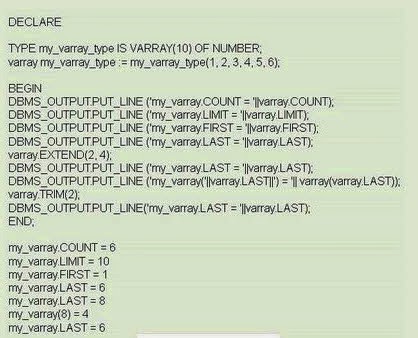
Example 2 of PL/SQL Varray

Example 3 of PL/SQL Varray


PL/SQL procedure successfully completed.

Let us take a look what the line varray.EXTEND(2, 4);does in the above code. It appends two copies on the fourth element to the collection. As a result, the seventh and eighth elements both contain a value of 4.

PL/SQL tables | PL/SQL tutorial pdf

PL/SQL tables

PL/SQL has two composite datatypes: 
TABLE and RECORD.

Objects of type TABLE are known as PL/SQL tables.
PL/SQL tables use a primary key to give you array-like access to rows. The number of rows in a PL/SQL table can increase dynamically.
The PL/SQL tables grows as new rows are added. PL/SQL tables can have one column and a primary key, neither of which can be named. The column can belong to any scalar type, but the primary key must belong to type BINARY_INTEGER.

A PL/SQL tables can consist of one simple datatype or be defined as a type of record and is sometimes referred to as an Index by table.
Rows in a PL/SQL table do not have to be contiguous.

Tables with simple datatypes can be populated as:
<variable>(<integer>) := <value>;

Tables with complex datatypes will need the columns populated individually as:
<variable>(<integer>).<column_name> := <value>;

Or from a cursor:
fetch <cursor_name> into <variable>(<integer>);

Example 1 of PL/SQL Table
Type my_first_table is table of varchar2(10)
Index by binary_integer;
Var_of_table my_first_table;
Var_of_table(1) := ‘hello world’;
Var_of_table(2) := ‘bye’;

Example 2 of PL/SQL Table
Type my_emp_table is table of emp%rowtype
Index by binary_integer:
Var_of_emp my_emp_table;
Var1_of_emp my_emp_table;
Var_of_emp(1).ename := ‘sachin’;
Var_of_emp(1).empno := 20;
Var_of_emp(1).sal := 3000;

To delete individual records from PL/SQL tables:
Var_of_emp .delete(1);

To remove all entries from a PL/SQL table:
Var_of_emp.delete;
Or
Var_of_emp := var1_of_emp
Where var1_of_emp does not contain any value, it is empty.
COUNT method can be used to return number of records in a PL/SQL Table.
Var_of_table.count
First, Next and Last methods of PL/SQL Tables.
First is for first index in the PL/SQL Tables.
Last is for last index in the PL/SQL Tables.
Next is for next index in the PL/SQL Tables.
Example showing First and Next method of PL/SQL tables

SQL> set serveroutput on
SQL> Declare

3 Type my_dept_table is table of varchar2(20)
4 Index by binary_integer;
5
6 Var_of_dept my_dept_table;
7 Index_value number;
8
9 Begin
10
11 For dept_rec in (select * from dept) loop
12 Var_of_dept(dept_rec.deptno) := dept_rec.dname;
13 End loop;
14
15 Index_value := var_of_dept.first;
16 Loop
17 Exit when index_value is null;
18 Dbms_output.put_line (index_value || ' ' ||var_of_dept(index_value));
19 Index_value := var_of_dept.next(index_value);
20 End loop;
21 End;
22 /

10 ACCOUNTING
20 RESEARCH
30 SALES
40 OPERATIONS

PL/SQL procedure successfully completed.
Another example of PL/SQL Table
DECLARE
 TYPE last_name_type IS TABLE OF student.last_name%TYPE
  INDEX BY BINARY_INTEGER;
 last_name_tab last_name_type;

last_name_type TYPE is declared based on the column LAST_NAME
of the STUDENT table.
last_name_tab is the actual index-by table declared as
LAST_NAME_TYPE.

DECLARE
 CURSOR name_cur IS
  SELECT last_name
  FROM student
  WHERE rownum <=10;

TYPE last_name_type IS TABLE OF student.last_name%TYPE
   INDEX BY BINARY_INTEGER;
   last_name_tab last_name_type;

v_counter INTEGER := 0;
BEGIN
     For name_rec IN name_cur LOOP
 v_counter := v_counter + 1;
 last_name_tab(v_counter) := name_rec.last_name;
 DBMS_OUTPUT.PUT_LINE('last_name('||v_counter||'): '||
 last_name_tab(v_counter));
     END LOOP;
END;

OUTPUT will be like:
last_name(1): Roy
last_name(2): Brit
....
....

PL/SQL Cursor Based Records

PL/SQL Cursor Based Records

Cursor-Based record has fields that match in name, datatype, and order to the final list of columns in the cursor’s SELECT statement.

Example 1 of Cursor Based Records
You can use the %ROWTYPE with an explicit cursor or cursor variable where each field corresponds to a column or aliased expression in the cursor SELECT statement.
In the below example, a record is declared with the same structure as an explicit cursor:
DECLARE
 CURSOR Books_Cursor IS
  SELECT * FROM books
  WHERE author LIKE '%john%';
my_book_cur_rec Books_Cursor%ROWTYPE;

Example 2 of Cursor Based Records
Cursor emp_cur is
Select ename, eno. , hiredate
From emp;
emp_rec emp_cur%ROWTYPE

Example 3 of Cursor Based Records
CURSOR c IS
SELECT beer, price
FROM Sells
WHERE bar = 'Joe''s bar';
Bp1 c%ROWTYPE;

PL/SQL Programmer Defined Records

PL/SQL Programmer Defined Records

These are records in which you, the programmer, define a record type.

Example 1 of Programmer Defined Records
Type my_first_record is record (
 Name Varchar2(20);
 Age Number;
 Salary Number;);
var_of_myfirstrecord my_first_record;

DECLARE
 TYPE employee_rectype IS RECORD (
 emp_id  Number(10) NOT NULL
       ,dept_no  dept.dept%TYPE
       ,name  empname_rectype
       ,hire_date DATE:=SYSDATE);

new_emp_rec employee_rectype;

BEGIN
 Do Some Processing...
END;

Example 2 of Programmer Defined Records
Type my_first_record is record (
Name varchar2(20);
Age number;
Salary number;);
Var_of_myfirstrecord my_first_record;

Example 3 of Programmer Defined Records
DECLARE
TYPE employee_rectype IS RECORD (
emp_id       NUMBER(10) NOT NULL
,dept_no     dept.deptno%TYPE
,n?me        empn?me_rectype
,hire_d?te   DATE := SYSDATE);
new_emp_rec employee_rectype;
BEGIN

PL/SQL Table Based Records | PL/SQL tutorial pdf

PL/SQL Table Based Records

You define and declare records either in the declaration section of a PL/SQL block, or globally, via a package specification. A table-based record is one whose structure is drawn from the list of columns in the table. A table-based record is drawn from a particular table structure.

%TYPE and %ROWTYPE
%TYPE is used to declare a variable that is of the same type as a specified table’s column.
Emp_number emp.empno%type;
%ROWTYPE is used to declare a record i.e. a variable that represents the entire row of a table.
Emp_record emp%rowtype

An Example of PL/SQL Table Based Records
A simple example showing that a record named "customer_sales_data_rec" is declared based on the row of customer_sales_data table.
Create Table customer_sales_data (
 cust_id NUMBER(6),
 cust_name VARCHAR2 (200),
 total_sales NUMBER (14,2)
 );

DECLARE
 customer_sales_data_rec customer_sales_data%ROWTYPE;
BEGIN
 Do some processing..;
END;


Blogger news